Contents
Instant Trade
One-click buying and selling from a small wallet that lives in your browser. Solana and Robinhood Chain.
Instant Trade removes the wallet pop-up. You press a button and the trade is signed and sent at once. It is built for new tokens, where seconds matter.
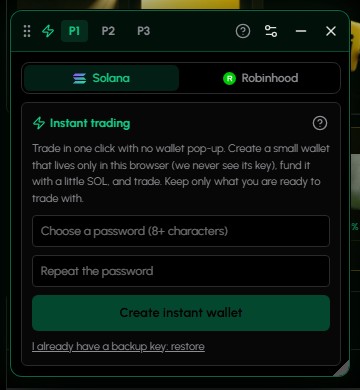 123456
- 1P1, P2, P3: three saved presets of amounts, slippage and fees. See Hotkeys and the tips below.
- 2Network switch: Solana or Robinhood. Each has its own wallet.
- 3Help: a short explanation of everything on this page.
- 4Password: at least 8 characters; it encrypts the key in this browser.
- 5Create instant wallet: generates the wallet inside your browser.
- 6Minimize and close: a minimized window keeps working.
Set up
- 1Click Instant Trade (the green button in the header, or beside Sort and Filters on any list).
- 2Choose a password, repeat it, and press Create instant wallet. The wallet is generated in your browser; our servers never see its key.
- 3You are shown a backup key once. Save it in a password manager or on paper, tick the box and continue.
- 4Copy the deposit address and send a little SOL (or ETH on Robinhood Chain) to it from your own wallet. When the balance appears, you can trade.
Trading
- Pick a buy amount (the buttons are editable with the gear). A ⚡ button then appears on every Solana token in the lists: one tap buys that amount.
- On a token page, the Instant box sits above the swap box and buys the same way.
- The sell buttons sell a percentage of the token you last bought, or the one you pick in the position list.
- Sell Init. sells just enough to take back what you put in, and keeps the rest running for free.
- At the bottom: Bought, Sold, Holding, Profit in SOL for the active token. They come from this wallet's own Instant trades; a token traded some other way shows zeros, not guesses.
Presets
P1, P2 and P3 each hold buy amounts, sell percentages, slippage and the priority fee. Change a number with the gear icon. A common setup is P1 small and fast, P2 normal, P3 large and careful.
Locking, coming back, forgetting
- Once unlocked, the wallet stays unlocked while the site is open: through refreshes, across pages and in other tabs. It locks when you close all tabs of the site or press Lock.
- Come back a day later: open Instant Trade, type your password, and the same address and funds are there.
- Forgot the password? It cannot be reset, because it is what encrypts the key. Remove the wallet and restore with the backup key under a new password: same address, same funds.
- Clearing the browser's site data, or using another browser, device or private window, starts from nothing. Only the backup key brings the wallet back.
Withdrawing
There is no withdraw button, because we do not hold your funds. They are in your own wallet. To take them out, import the backup key into a Solana wallet such as Phantom or Solflare (Add / import account, then Private key). For Robinhood Chain, import the 0x key into MetaMask or another EVM wallet. The same address and balance appear there.
Costs and limits
- 0.3% platform fee plus the network fee and an optional priority fee you set.
- A trade whose price impact would exceed 30% is refused: the pool is too thin.
- If a trade fails for slippage it is retried from a fresh quote, up to three times, with wider slippage.
Something unclear or out of date? Tell us in Discord or Telegram. Nothing here is investment advice.