Contents
The token page
Trading
Discover
The token page
Anatomy of a token page
A tour of everything on a token page, from the stats strip to the swap panel.
Open any token and you land on its page. The layout is the same for every token on every chain: facts and chart on the left, the swap panel and the risk readings on the right.
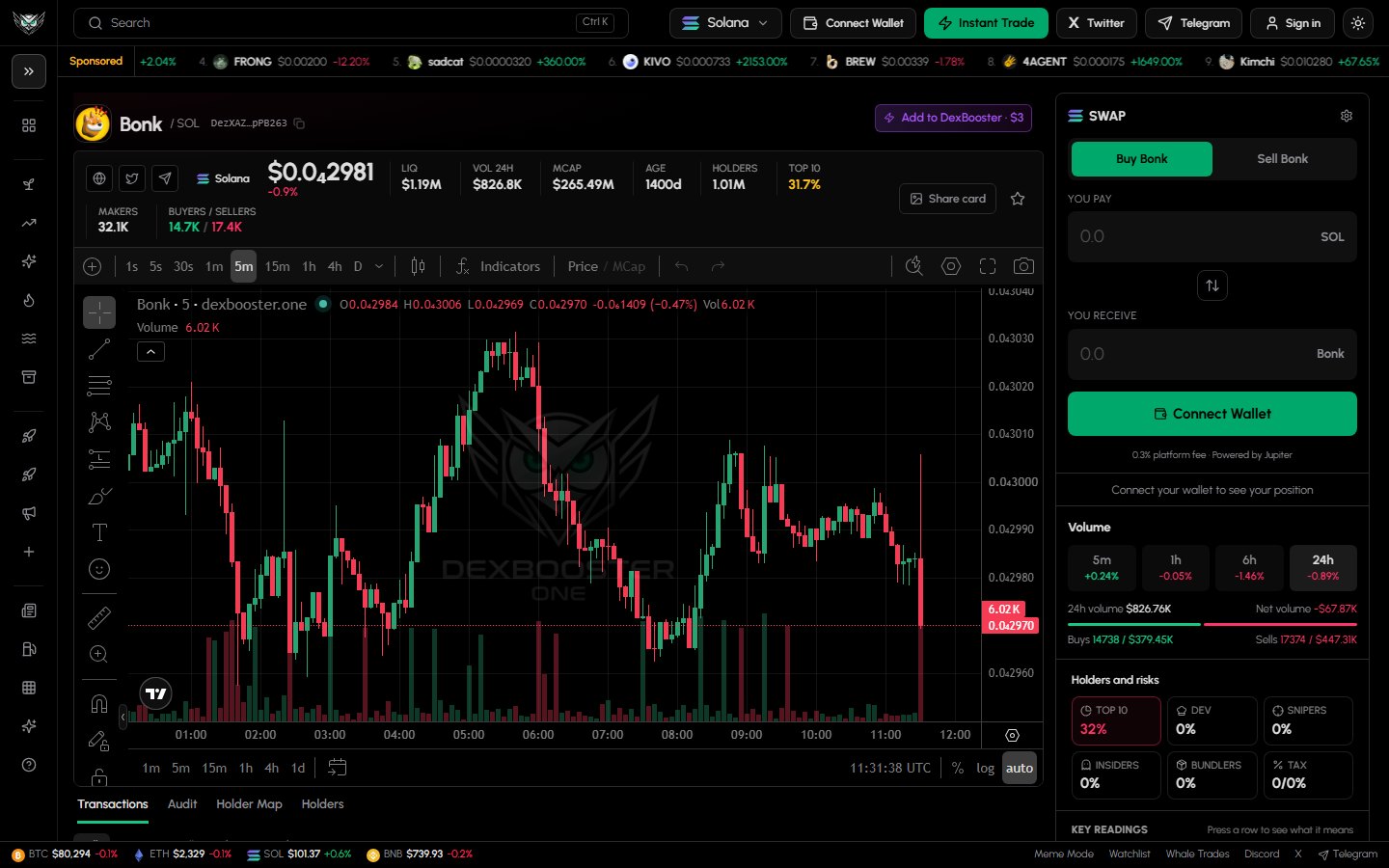 123456789
- 1Identity: logo, name, symbol and the contract address (click to copy). Always confirm the address, not the name.
- 2Stats strip: liquidity, 24h volume, market cap, age, holders and top-10 share, with makers and buyers/sellers below.
- 3Share card and star: make a picture of the token to post, and add it to your watchlist.
- 4Timeframes: from 1 second to a day. See The chart.
- 5Chart: live candles and volume.
- 6Swap panel: buy or sell with your wallet. See Swap.
- 7Volume and Holders and risks: buy/sell split over four windows and the share held by the top wallets, developer, snipers, insiders and bundlers.
- 8Tabs: transactions, audit, holder map and holders.
- 9Bottom bar (desktop): BTC, ETH, SOL and BNB prices, with a chart on hover, and shortcuts.
The stats strip
These figures are the first screening you should do.
| Figure | What it is | What to look for |
|---|---|---|
| LIQ | Money in the pools you would trade against. | Thin pools mean big price impact and hard exits. |
| VOL 24H | Traded value over the last day. | Compare it with liquidity: trading many times the pool is healthy; almost none means nobody is there. |
| MCAP | Price times supply. | A high cap on a small pool is a thin float: the cap says little about what you can sell for. |
| AGE | Time since the token's first pool. | Brand-new tokens have no history to judge. |
| HOLDERS | Number of wallets that hold it. | Few holders on a big cap is a warning. |
| TOP 10 | Share held by the ten largest wallets. | Turns amber above 30% and red when it is higher. |
| MAKERS | Distinct wallets that traded in 24h. | A real crowd, not a handful of wallets. |
| BUYERS / SELLERS | Distinct buyers and sellers in 24h. | Heavy one-sidedness for a long time is a signal in itself. |
Tip
Not every figure exists for every token. When data is missing we show nothing or a dash instead of a guess.
The swap column
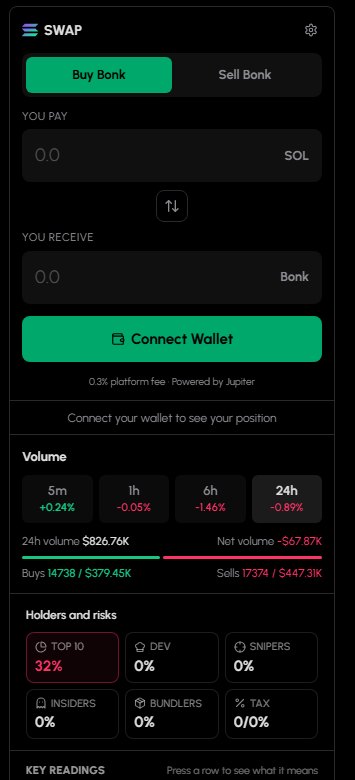 123456
- 1Buy / Sell switch.
- 2You pay and You receive: type an amount and the quote appears.
- 3Connect Wallet: becomes the swap button once a wallet is connected.
- 4Fee line: the platform fee and the route provider.
- 5Volume windows: 5 minutes, 1 hour, 6 hours, 24 hours. Click one to change the buy/sell split shown.
- 6Settings: slippage and related options.
Under the chart
- Transactions: the live trade feed, with filters for buys, sells and size. See Transactions and traders.
- Audit: the checks behind the verdict, one by one.
- Holder Map: who holds the supply and which wallets move together.
- Holders: the top wallets with their profit already taken and still on paper.
Something unclear or out of date? Tell us in Discord or Telegram. Nothing here is investment advice.