Contents
The token page
Trading
Discover
For projects
Listing your token
Put your token on the terminal with its logo, description and links, and keep it up to date yourself.
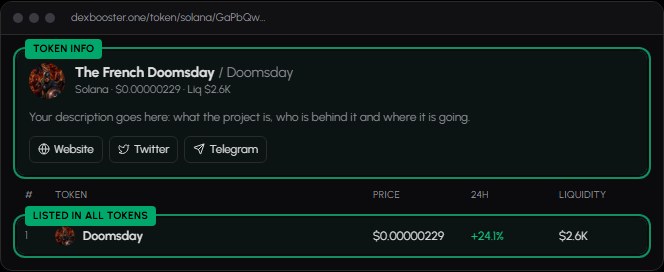
What a listing gives you
- Your logo, name and description on the token page.
- Website, X and Telegram buttons.
- A row in All Tokens, and a place in search across the whole site.
- The ability to edit all of it yourself later.
How to list
- 1Open Add Token in the sidebar.
- 2Choose the chain and paste the token's contract address.
- 3Fill in the logo, description and links.
- 4Pay the one-time listing fee from your wallet.
- 5The token enters the review queue and appears in the sections it qualifies for once it is approved. A token that buys a boost, a pinned row, a banner or a bundle is approved and listed at once.
Keeping it up to date
Sign in and open My Tokens in your Cabinet. The tokens you listed are there, and you can change the description, logo and links whenever the project changes.
Note
A listing is not an endorsement. Every listed token is audited and shown the same way as any other.
Something unclear or out of date? Tell us in Discord or Telegram. Nothing here is investment advice.